

So many calls from people wanting help with their no-code or low-code applications. Staggering really.
So, I want to talk about something that’s becoming increasingly relevant in our digital world: the art of working with no-code and low-code software. I’ve seen the incredible rise of platforms that let us build powerful applications with minimal to no traditional coding. It’s pretty amazing actually, putting the power of creation into more hands than ever before.
And, of course, with great power comes great responsibility and an even greater potential for trouble once you get past the “awe” phase of your no-code development.
But let’s be honest, even with the magic of drag-and-drop interfaces and pre-built components, things don’t always go perfectly. I’ve encountered that moment when a carefully crafted no-code app decides to throw a digital tantrum, or when a client asks for a tweak that seems just beyond the platform’s initial scope. That’s where the “taming” comes in – the crucial practices of debugging, editing, adapting, and sometimes, outright fixing our no-code and low-code creations.
At FDGweb, we live and breathe this stuff, and I’ve learned a few valuable lessons along the way. We’ve worked extensively with clients on platforms like Monday.com, Loveable, Airtable, and Bubble.io, helping them not just implement solutions, but also extend, adapt, and yes, sometimes outright fix complex configurations. Here are some of our best practices for ensuring your no-code and low-code projects remain robust, adaptable, and ultimately, successful:
The Core Principles of No-Code Fortitude
1. Understand the “Why” Before the “How”
Before you even think about debugging or making changes, take a step back and understand the original intent of the feature or application. What was it supposed to do? What problem was it trying to solve? Often, issues arise from a misunderstanding of the initial design or an evolving set of requirements. A clear understanding of the “why” will guide your “how” in terms of fixes and adaptations. This is especially true when dealing with interconnected systems, perhaps trying to get Monday.com to perfectly sync with an external database or your app to respect external API rate limits.
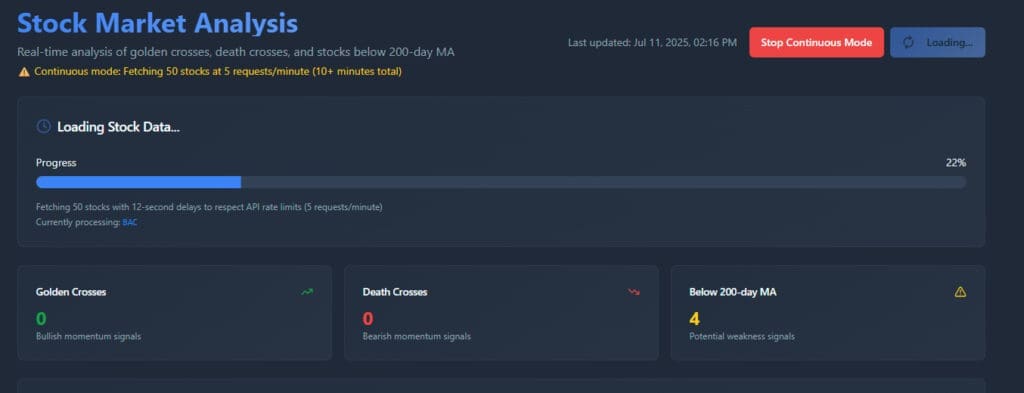
I recently had this problem with a stock tracking app that used Polygon for its source of data and was limited to 5 requests a second in the sandbox until we upgraded and put in rate limits on how it fetched its data.
2. Leverage the Platform’s Debugging Tools (They’re There for a Reason!)
Most reputable no-code/low-code platforms offer some form of built-in debugging or error-reporting tools. Don’t ignore them! These can provide invaluable insights into what went wrong. Whether it’s a visual debugger, a log of recent actions, or error messages that pop up, learn to interpret these signals. They’re your first line of defense. I’ve often found obscure errors in Bubble.io applications by diligently sifting through their powerful debugger.
3. Isolate and Conquer: The Art of Reproducibility
When an issue arises, try to isolate the problem. Can you consistently reproduce it? What are the exact steps that lead to the error? This might involve disabling certain features, simplifying workflows, or testing with specific data sets. The more precisely you can reproduce the bug, the easier it will be to pinpoint its source. This methodical approach is key, whether you’re troubleshooting a formula in Airtable or a complex workflow in a project management tool.
4. Version Control (Even in No-Code!)
While not always explicit, think about how you can implement a form of version control. This might mean duplicating your application or workflow before making significant changes, or utilizing any “undo” or “revert” features your platform offers. This allows you to roll back to a stable version if your modifications introduce new problems. For critical Monday.com automations or Airtable bases, making a copy before significant changes can save you a lot of headaches.
5. Documentation is Your Best Friend (Seriously)
Even for seemingly simple no-code solutions, document your logic. Why did you set up that particular automation? What’s the purpose of that custom field? Future you, or anyone else who needs to work with your creation, will thank you. This can be as simple as adding notes within the platform’s interface or keeping a separate changelog. This becomes even more vital when extending platforms like Bubble.io with custom code or external API integrations.
6. Embrace Iteration and Small Changes
Resist the urge to make a dozen changes at once. When debugging or adapting, make small, incremental adjustments and test after each one. This makes it much easier to identify which specific change introduced or fixed the problem. It’s like scientific experimentation – one variable at a time! This principle applies whether you’re adjusting a view in Airtable or refining a complex user flow in Bubble.io.
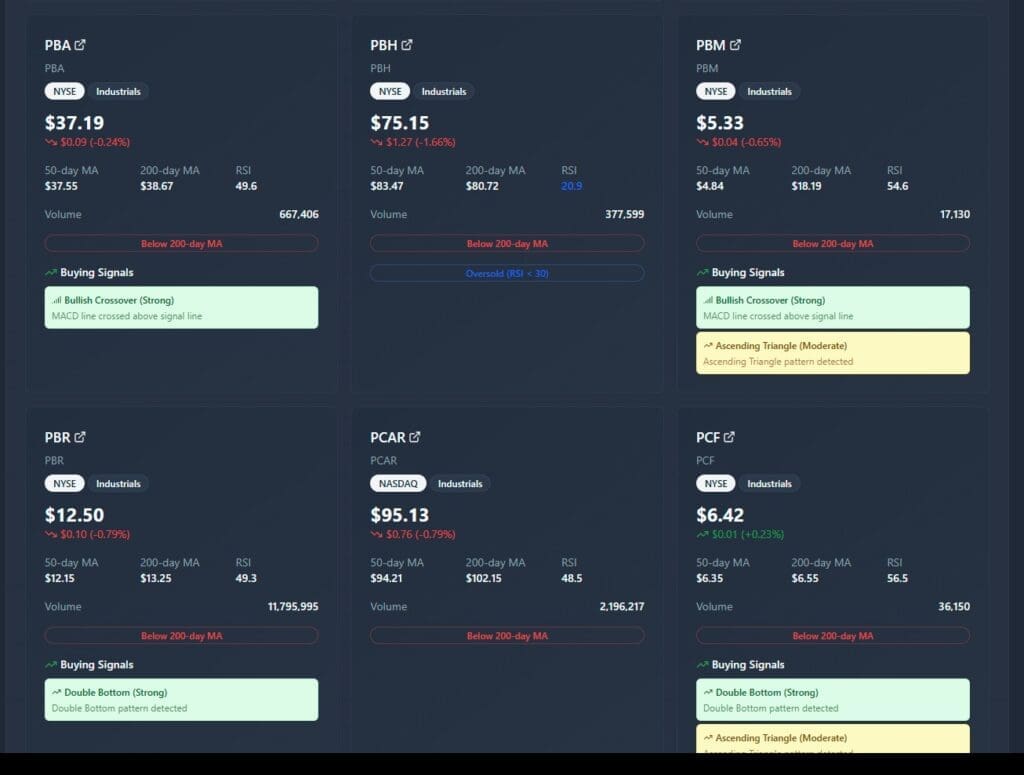
Here’s another refactor where I added in Buying Signals and tied them to filters by # of signals per security.
7. Don’t Be Afraid to Rebuild (Sometimes)
In some cases, especially with highly complex or interconnected no-code solutions, it might be more efficient to rebuild a problematic section from scratch rather than trying to untangle a spaghetti of logic. This is particularly true if the initial build wasn’t well-planned or has accumulated too many “band-aid” fixes. I’ve seen situations where a fresh start was far more efficient than trying to patch a deeply flawed original.
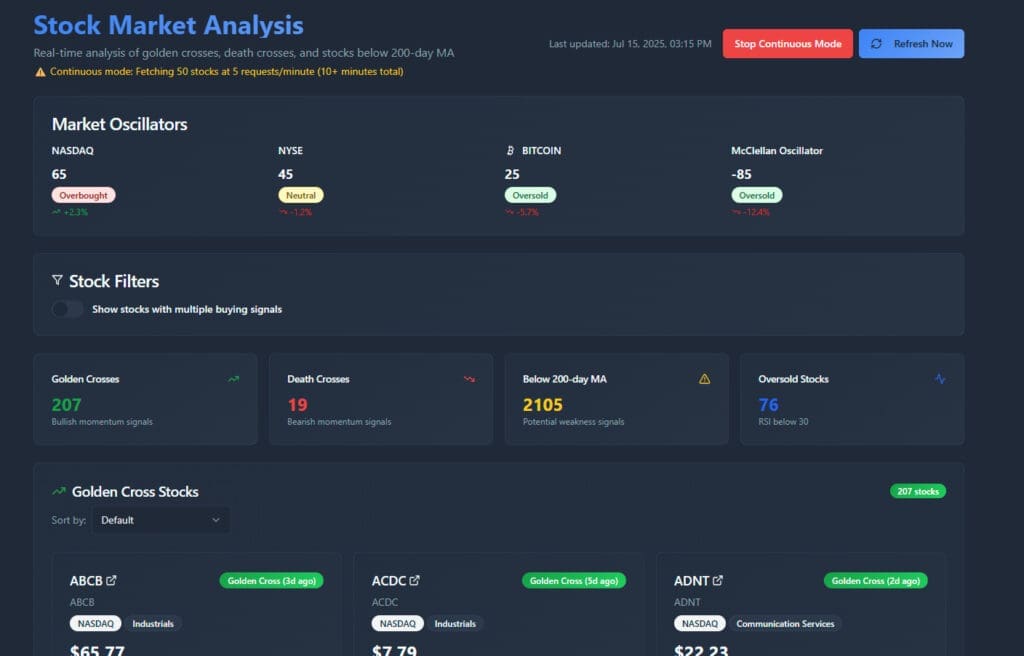
Here’s the rebuild of that reporting tool with filters and jump links in mind using Loveable:
8. Community and Support are Goldmines
No-code and low-code platforms often have vibrant communities, forums, and excellent support documentation. If you’re stuck, chances are someone else has encountered a similar issue. Leverage these resources! The collective knowledge of the community can be incredibly valuable. Whether you’re searching for a specific Monday.com integration trick or a complex Bubble.io workflow example, the community is a powerful tool.
No-Code, Heal Thyself
This might sound counterintuitive, but often the best way to fix a no-code problem is by using other no-code tools or features within your existing platform. Think about it:
- Conditional Logic to Bypass Errors: If a specific part of your workflow is consistently failing, can you use conditional logic to temporarily route around it or display an error message that guides the user?
- Temporary Data Views for Diagnostics: When troubleshooting data issues in Airtable, creating a temporary “debugging view” with specific filters or calculated fields can quickly highlight discrepancies.
- Automated Alerts for Monitoring: Set up automations within your no-code platform (like Monday.com or Bubble.io) to notify you when certain error conditions are met or when a process fails. This proactive monitoring can pinpoint problems before they escalate.
- “Sandbox” Environments: Many platforms allow for creating duplicate or “staging” versions of your application. Use these to test changes without impacting your live environment, effectively using no-code to test and fix no-code.
- Workflow Reordering/Simplification: Sometimes a complex, multi-step workflow can become brittle. Can you break it down into smaller, more manageable no-code automations? Simpler often means more robust.
The idea here is to use the very tools that empower no-code development to diagnose, mitigate, and even resolve issues, leveraging the platform’s native capabilities to streamline your debugging process.
When Low-Code Bridges the Gap
Strategic Use of “Low-Code” for “No-Code” Gaps
This is where the “low-code” part truly shines for “no-code” limitations. If you hit a wall with pure no-code, explore how you can introduce small snippets of code (e.g., custom scripts, API calls) to bridge the gap. This often unlocks a whole new level of flexibility and power without requiring a full-blown development effort. We’ve helped clients extend the functionality of Airtable with custom scripts and integrated Monday.com with unique external services using targeted API calls, effectively turning a “no-code” solution into a robust “low-code” powerhouse.
The beauty of no-code and low-code is their accessibility, but mastering them also involves a certain discipline. By adopting these best practices, you’ll be better equipped to debug those pesky errors, seamlessly adapt to changing needs, and ultimately, build more resilient and effective applications, no matter if you’re working with Monday.com, Airtable, Bubble.io, or any other powerful platform.
What are your go-to strategies for taming the no-code beast? I’d love to hear your thoughts and experiences in the comments below! If you have a no-code project you’d like us to look at, send us a message through our form below.