

At FDGweb, having been in the web design business for 24 years, we’ve seen Google introduce many tools, but their new Benchmarking feature is something special.
Google Benchmarking helps give you the data you need to make informed decisions and stay ahead of your competitors.
If you want to improve your site’s performance, this feature could be the key.
What Is Google Benchmarking?
Simply put, Google Benchmarking lets you compare the performance of your website to others in the same industry.
It provides key data—like traffic sources, session duration, and user engagement rates—so you can see how you stack up against your competitors.
Think of it like a report card that shows not just your grades but also how your peers are doing.
It helps answer questions like: “Am I doing better, worse, or about the same as other sites like mine?”
How Benchmarking Empowers Smarter Website Decisions
By utilizing Google Benchmarking, businesses gain a competitive edge through data-driven insights.
Here’s exactly why Google Benchmarking is a game-changer for website owners like you:
- Spot Trends: It helps you identify trends affecting your industry. Let’s say you’re noticing a dip in traffic. With benchmarking, you can check if other sites in your sector are also seeing declines. If they are, it might be a seasonal slowdown. If they aren’t, it could signal an internal issue like poor user experience or technical problems.
- Competitive Insights: Benchmarking also lets you see where your website is excelling and where it needs work. Are your competitors driving more traffic from social media? Maybe it’s time to revamp your social strategy. Seeing higher session durations in your peer group? That could mean they’re doing something with their content that’s keeping visitors more engaged.
Practical Uses of Benchmarking for Your Website
To show you the real-world value of benchmarking, let’s look at two examples:
Example 1: Seasonal Slowdowns. Imagine you run an online store for outdoor gear, and over the last two months, your traffic has slowed. With benchmarking, you compare your performance against similar outdoor websites and find that they’re experiencing the same dip.
Thanks to those insights, you realize it’s a typical off-season pattern and decide to hold off on launching an expensive ad campaign, saving your budget for busier months.
Example 2: Spotting Untapped Potential. Let’s say you manage a blog for a consulting firm. After using Google Benchmarking, you notice that while your site’s bounce rate is lower than the industry average, your session durations are shorter. You dig into this data and discover that visitors leave after reading just one article. Armed with this info, you add internal links and related article recommendations, increasing session duration and engagement.
By comparing your website’s performance to others in the same industry, you can see whether dips in traffic are part of a larger trend or unique to your site. It also uncovers areas where you might have untapped potential, allowing you to adjust your strategy.
Whether you’re trying to manage seasonal slowdowns or optimize user engagement, benchmarking provides the insights you need to make smarter, more strategic choices for your business.
How to Set Up Benchmarking in Google Analytics
Setting up benchmarking in Google Analytics is straightforward, but there are a few requirements.
Here’s how to get started:
- Log into Google Analytics: Go to your Google Analytics dashboard.
- Enable Data Sharing: In your Admin settings, navigate to Account Details setting and enable “Modeling contributions & business insights“. You need to opt in to share your data with Google for it to be compared to industry averages.
- Navigate to the Overview Card: Once data sharing is enabled, go to the overview card on the Home page, and select the metric you want to change.
- Expand the Benchmarking category: Select one of the metrics for which you want to view benchmarking data
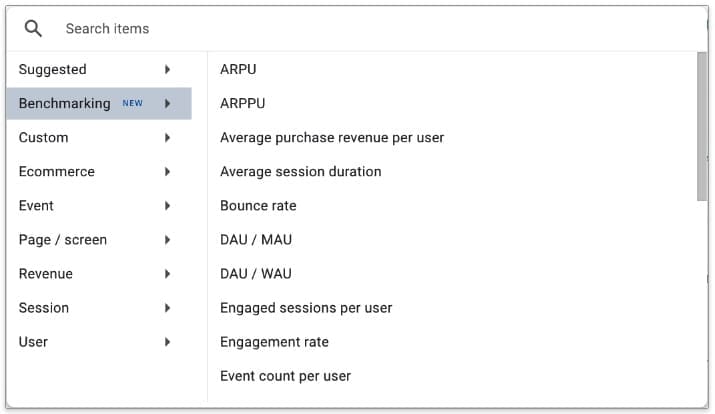
- Select Your Industry and Size: Google will prompt you to choose an industry category and the size of your business based on daily sessions. This ensures that your benchmarks are relevant to your niche.
- Choose Your Viewing Preference: You can toggle benchmarking data on and off by clicking on the blue ribbon in the top right corner of the overview card.
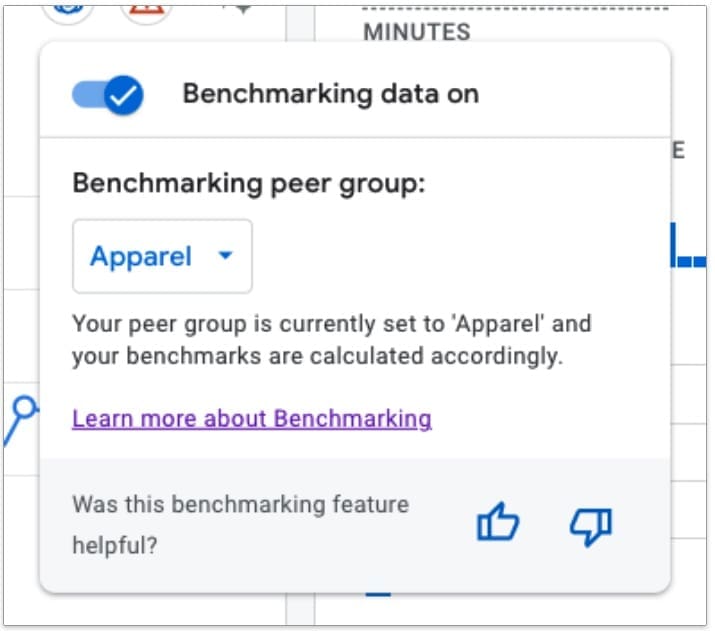
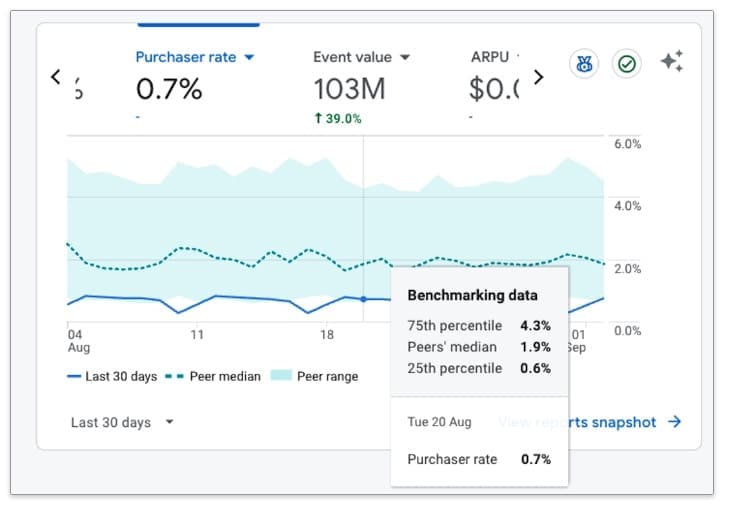
When you enable benchmarking data, the overview card displays the following:
- Your property’s trendline as a solid line.
- The median performance of your peer group as a dotted line.
- A shaded area representing the range of your peer group’s performance.
The benchmark range falls between the 25th and 75th percentiles, allowing you to assess your relative performance and make informed decisions. You can hover over the trendline for more detailed insights.
Caveats and Limitations: Does your website qualify for Benchmarking?
Not everyone qualifies for benchmarking. To be part of a peer group, your website needs to meet certain criteria:
- Traffic Minimums: You must have enough daily users to generate meaningful data. Sites with very low traffic might not see benchmarking results because Google can’t compare them to similar properties. Google has yet to publish the set minimum, but stay tuned because we will keep you updated when it becomes publicly available.
- Industry Fit: If your website operates in a niche with too few comparable sites, benchmarking data may not be available. The more specific your industry, the harder it may be for Google to form a solid peer group
For more information about Google Benchmarking, you can check out Google’s Announcement Article.
Stay Competitive with Benchmarking Insights
Google Benchmarking is an invaluable tool for any website owner who wants to stay competitive.
Whether you’re experiencing a slow season or looking for ways to improve, benchmarking allows you to make data-driven decisions.
At FDGweb, we specialize in helping businesses leverage tools like Google Benchmarking to optimize their digital strategies.
If you’re ready to get the most out of your website and stay ahead of the competition, we’re here to help every step of the way.